Google has a stated goal of making the web more secure by requiring a secure connection between a site and its users. They are slowly rolling out a series of changes to their Chrome browser, which will throw up flags and notifications that a connection is not secure. Right now there are just soft warning showing the site is not secure.

Soon Google will begin to make this warning much more pronounced, and show it before any of the site’s content. It will scare visitors from websites, and look something like this:

These warnings will also appear on web forms, such as lead collection input fields, if the site does not have a security certificate. This is going to severely lower conversions on websites which are not security compliant. This means that even if your site has a contact form, if it is not secure, the user will get a warning in their browser. This warning would be enough to discourage most site visitors from interacting with the site and entering their contact info, opt-in to a list, or make a purchase. The result is a loss of leads, lost sales opportunities, and tons of lost revenue for any business that makes money or collects customer info on the internet. In fact, Google had to slow down these changes because 90% of all websites do not offer a secure connection.
Whenever you use the web, your computer connects to a server over the internet. Data passes between your computer and this server. This data could be images, text, and other content. When the connection between you and this server is NOT secure, any information passed between them can be intercepted and captured. That means hackers can steal the information, and use it to do great damage such as identity theft and emptying bank accounts. A good example of this is a POP3 Email Account, which generally sends the username, password, and email messages in clear text that someone could read if they were intercepting that connection. For a website that accepts credit cards, passwords, and other personal information, having a secure connection between the site and visitors is a matter of extreme importance. And soon, because of Google’s updates to Chrome; it is going to be a requirement.
You can see this yourself if you use a program called WireShark. This application allows you to view the packages of data that are flowing on your computer network. You’ll be surprised at what you’ll see
if you watch a connection stream. In fact, if you were to sit in a coffee shop or public place that offers free Wi-Fi and run WireShark on your laptop, you’ll detect lots of unsecured private information flying around.
A secure connection scrambles this data stream, making it unreadable by unauthorized parties who may be “listening” in on the connection between a web server and its visitors.
Chrome indicates a secure connection with a Green padlock and either the company name in green text or the word “Secure” in green text. The website address also has a “https://” prefix.
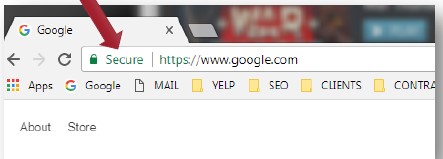
Even if you’re not that familiar with what a Secure Sockets Layer (SSL) certificate is, you probably know to look for a green padlock icon or the https:// prefix on the website address before entering a credit card. These features indicate the presence of an SSL Certificate on the website which secures the website visitor’s information.
Installing a Secure Sockets Layer (SSL) certificate on a website accomplishes two things. It builds trust as the website visitor know that the identity of the website owner has been authenticated by an independent third party and it secures the connection between the visitor’s browser and the web server by encrypting the data that is passed between them.
Unfortunately it can be a daunting task for a non-technical person to install an SSL Certificate. Please call (403) 220-0019 to find out how we can help you with this.
There are several types of SSL Certificates. All of them will secure your visitor’s data. The difference between these SSL Certificates is in the degree of trust that they add to your website. Trust is created by the assurance that the website ownership was confirmed by an independent third party.
- Domain Validated (DV): The least expensive version provides the least amount of assurance. Visitors can be assured that the purchaser of the SSL Certificate was in control of the website at the time the certificate was issued.
- Organization Validated (OV): This is a mid-level cost. In addition to the DV assurance it also assures that the organization existed in the public register and is a valid business concern.
- Extended Validation Certificate (EV): The highest cost option also provides the highest level of assurance. The organization goes through a much more stringent authentication process.